Training
Competency, signed twice.
Curricula follow roles. Retraining follows the document. The learner signs their assessment. A second person signs their competency, on a second record. By default, completion alone does not count as trained.
How work arrives
The matrix assigns. The document retrains.
Training that exists only when someone remembers to launch it is training that lapses. Three of the four ways an assignment is created are events, not decisions.
Four ways in, one assignment
- Automatic
A role is granted
- Automatic
An invitation is accepted
- Automatic
A document version takes effect
- By hand
Someone launches it
Every source produces: A training instance, fixed at launch
Roles × curricula
Courses bundle into curricula, and curricula map to roles. Change the org chart or the SOP, and the assignments follow. Nobody maintains a spreadsheet.
| Role | QA Core GMP Curriculum | QC Laboratory Curriculum |
|---|---|---|
| Quality Manager | Mapped | Not mapped |
| QA Reviewer | Mapped | Not mapped |
| QC Analyst | Not mapped | Mapped |
One learner, one assignment
Assigned is not trained, and completed is not verified
This is the trail a single learner’s assignment follows. Completion is the learner’s own act. Verification is someone else’s, and it is written to a different record.
Eight states, and the moves between them
The forward path
Step 1: Assigned
Step 2: In progress
Step 3: Completed
Shown in the app as “Pending Verification”
Step 4: Verified
Branches
- Failed
From Assigned In progress
- Retrain required
From Completed Failed
Ways out
- Removed
From Assigned In progress Failed Verified Retrain required Cancelled
- Cancelled
From Assigned In progress Failed
Two records, two signers
Each signature re-authenticates the person signing before anything is written, and each lands on a record of its own.
- Signature 1 · the assessment
The learner
- Written to
- Their own assignment on the training instance
- Asked for
- On submitting the assessment, in the e-signature dialog. Their identity is checked first, so a failed signature leaves no half-written attempt.
- Stamped on the row
- Completed or Failed
- Score
- Attempt number
- Completed at
- Signed at
- Signature method
Refused
- Server refusesAnother attempt once the attempts fixed at launch are used up.
- Database refusesReading the answer key. It is stored apart from the questions the learner’s app receives, and grading happens on the server.
- Signature 2 · the verification
The manager of record
- Written to
- A verification record of its own, one per learner, per instance
- Asked for
- Once every learner on the instance has finished, a verification task goes to the launch’s manager, else the training’s, else whoever launched it.
- Stamped on the row
- Understanding demonstrated
- Can perform independently
- Practical observation completed
- Approved or Retrain required
- Notes
- Signed at
- Signature method
Refused
- Server refusesApproval without all three criteria confirmed.
- Server refusesVerifying by anyone other than the manager of record, or by the learner themselves.
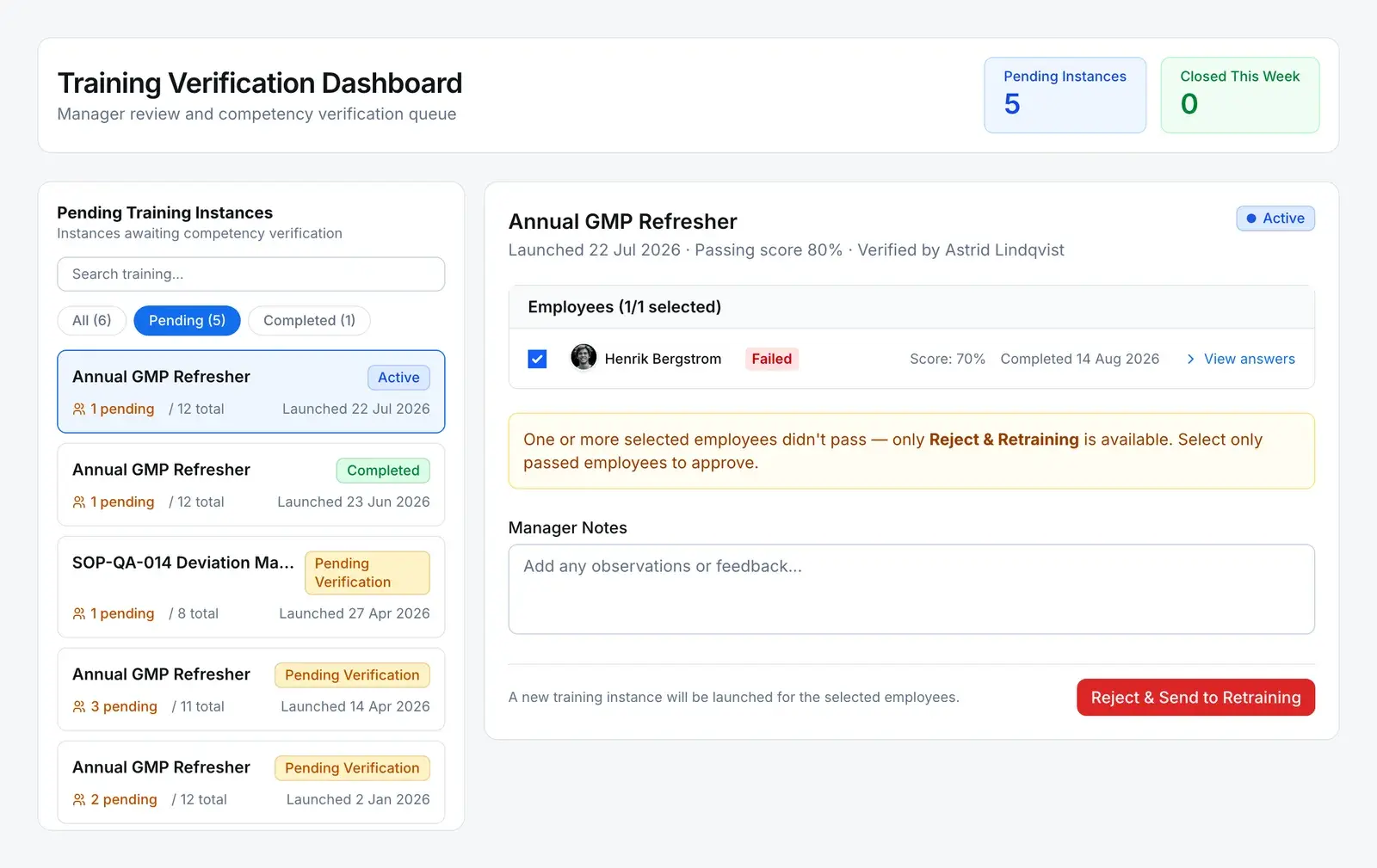
- Server refusesApproving a learner who failed. The only way on is retraining.
Only a Verified assignment counts as trained. The log-book gate, which stops untrained people filing entries against a controlled SOP, admits nobody else. Where a training has verification switched off, a completed assignment is promoted to Verified on its own.
Where it comes from
A document takes effect, and the people it names are retrained
Training is where a controlled change reaches the people who work to it. The instance is fixed to the exact version that took effect, so the record says which revision someone was trained on.
Comes from — Training
DocumentAssigned
When a version takes effect, the people it names are assigned training on that exact version — where training is set up for the document.
Leads to — Training
Training is the end of the chain. What it produces is the evidence: who was trained, on which version, verified by whom.
Any NC, CAPA, change request, internal complaint, quality event, inspection lot, document or custom-module record can also be linked by hand as related.
The rules
What training will not let you do
- Mark someone trained directly
- A database trigger refuses any direct write of a status, score, completion time, attempt count or signature on an assignment, and refuses a new assignment that arrives already complete. Progress is recorded only through start, submit and verify.
- Database refuses
- Skip a state
- The same trigger holds the list of legal moves. Completed to Verified is on it. Assigned to Verified is not, and neither is reopening a Failed attempt as Assigned.
- Database refuses
- Change what was taught after launch
- An instance’s snapshot (content, assessment, passing score and attempts, plus the version for a document launch) and its verifying manager cannot be changed once launched. A wrong one is cancelled and relaunched.
- Database refuses
- Verify your own training
- Verification is refused to anyone but the manager of record, and refused for any learner who is the person signing.
- Server refuses
- Remove or cancel without a reason
- Taking a learner off an instance, or cancelling the instance, is refused without a written reason, and the reason is kept on the record.
- Server refuses
- Decide who verifies
- Verification is on by default and set per training, and a launch can name its own verifying manager. Switch verification off and completion counts as verified.
- You configure
Specifics
The questions a quality manager asks second
What actually happens when an SOP is revised?
Nothing, until the new version takes effect. At that point, if training is set up on the document and a manager is named, the training for that document is found or created and an instance is launched on the version that just took effect. It is assigned to the curricula and people in the training settings, and their tasks go out. The training also joins those curricula, so whoever is given one of their roles later is assigned it too. The launch runs once per version and never assigns anyone twice.
Is manager verification required on every training?
No. It is a setting, on by default. Leave it on and, once every learner has finished, the instance waits for verification and the manager of record gets a task. Switch it off and the instance completes by itself, and each completed learner counts as verified without a verification record.
Who is allowed to verify?
The manager of record for that instance: the manager named on the launch, otherwise the manager named on the training, otherwise the person who launched it. Nobody else can verify, and nobody can verify themselves, even if they manage the training. Approval needs all three competency criteria. Retraining does not.
What happens when someone fails the assessment?
A signed submission below the passing score marks the assignment Failed. If the training allows more than one attempt, the learner can try again, and a pass moves them to Completed. A failed learner cannot be approved: the manager’s only option is retraining, which launches a fresh instance for them. The failed attempt and the retake stay as two separate, dated records.
Are training signatures part of the e-signature ledger?
No. Both signatures re-authenticate the person signing and record the verified method and time, but they are stored on the training records themselves, not in the signature ledger that nonconformance, CAPA and change request closures write to. The training records are covered by the audit trail.
Does training run on the same approval workflow as documents and CAPAs?
No. Training has its own assignment and verification service, and its states move on that service’s actions (start, submit, verify) rather than on workflow steps. It shares the task inbox and the audit trail, so learners and managers find their training work in the same place as everything else.