QC Inspection & AQL
Accept lots on the math and on calibrated gauges.
Incoming, in-process and final inspection against versioned specifications and seeded ANSI/ASQ Z1.4 and ISO 2859-1 tables. The server works out the sample size, refuses a result from an out-of-calibration instrument, and leaves the disposition to QA.
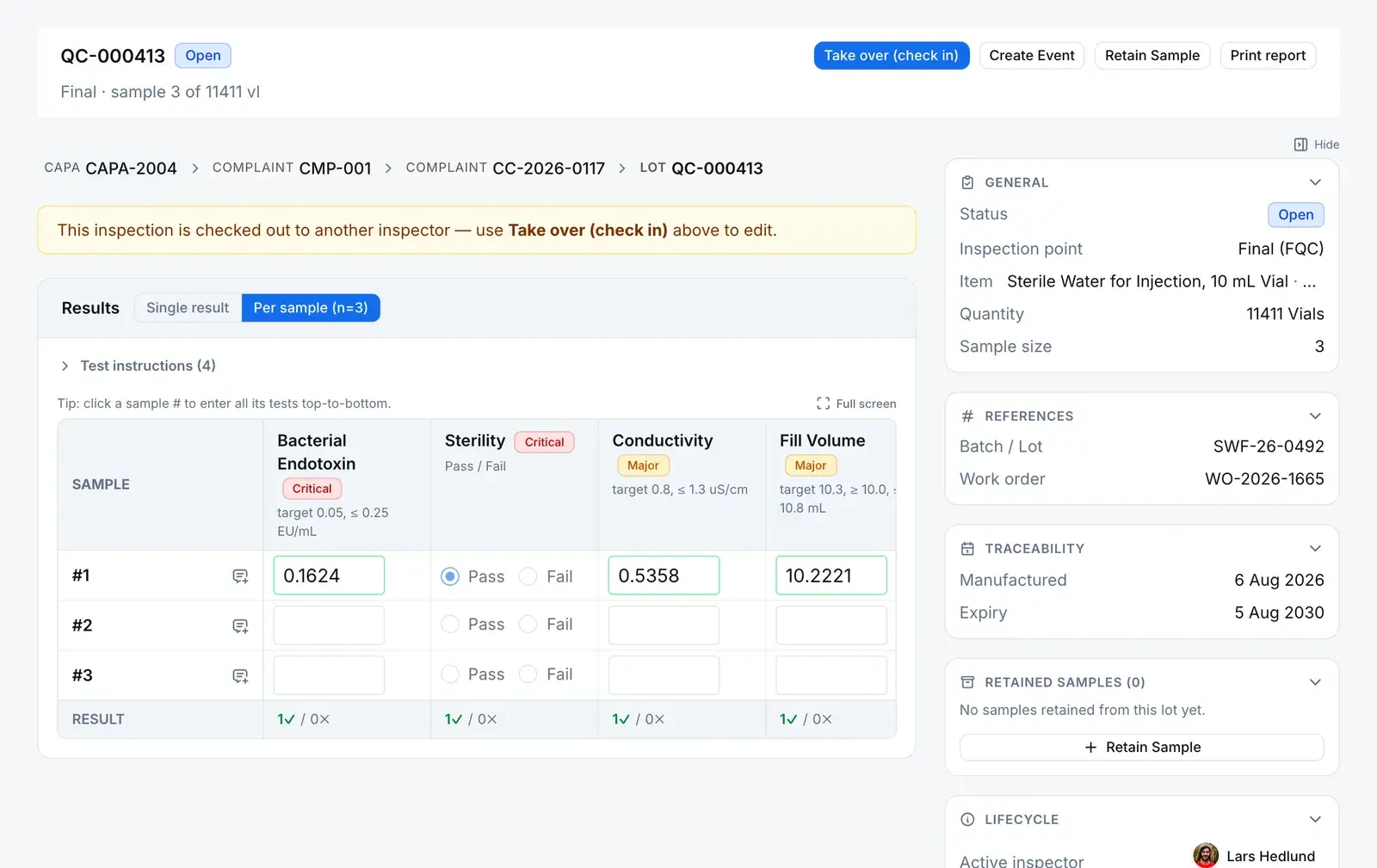
What a lot is built from
The sample size is looked up, not typed.
Five pieces of master data sit behind every lot. When a lot is raised, the server reads its quantity against the plan’s standard and freezes the specification and sampling plan onto the lot.
Set up once
Item
Specification
Sampling plan
Defect catalog
Inspection plan
The inspection lot
Carries a frozen copy of the specification and sampling plan it was raised against, and the sample size and Ac/Re the server computed from the lot quantity.
1 · Lot size
32,000
2 · Inspection level
II
3 · Code letter
M
4 · Sample size
n = 315
| Defect class | AQL | Accept (Ac) | Reject (Re) |
|---|---|---|---|
| Critical | 0.65 | 5 | 6 |
| Major | 1.5 | 10 | 11 |
| Minor | 4.0 | 21 | 22 |
Defects and failed results are tallied per class. A class rejects when its count reaches Re, and the lot’s verdict is Reject if any class rejects. Change the lot quantity and the server recomputes the letter, n, Ac and Re.
The gates
Four refusals on the way to a decision.
A lot moves from Pending to Under review only through the server’s own actions, and each one checks something first. Then the sample has its say, and QA has the last word.
Refused until…
Gate 1 · Start, sample, capture refused until
You are the checked-in inspector
Only the inspector checked in on the lot can run its execute actions. Anyone else has to check in to take it over, and the lot shows who holds it.
Phase: Pending Server refusesGate 2 · Sample collection refused until
The production lot’s line clearance passed
The checklist is copied onto each production lot when it is created, and the answers are checked on the server, not just in the form.
Phase: In progress Server refusesGate 3 · Result capture refused until
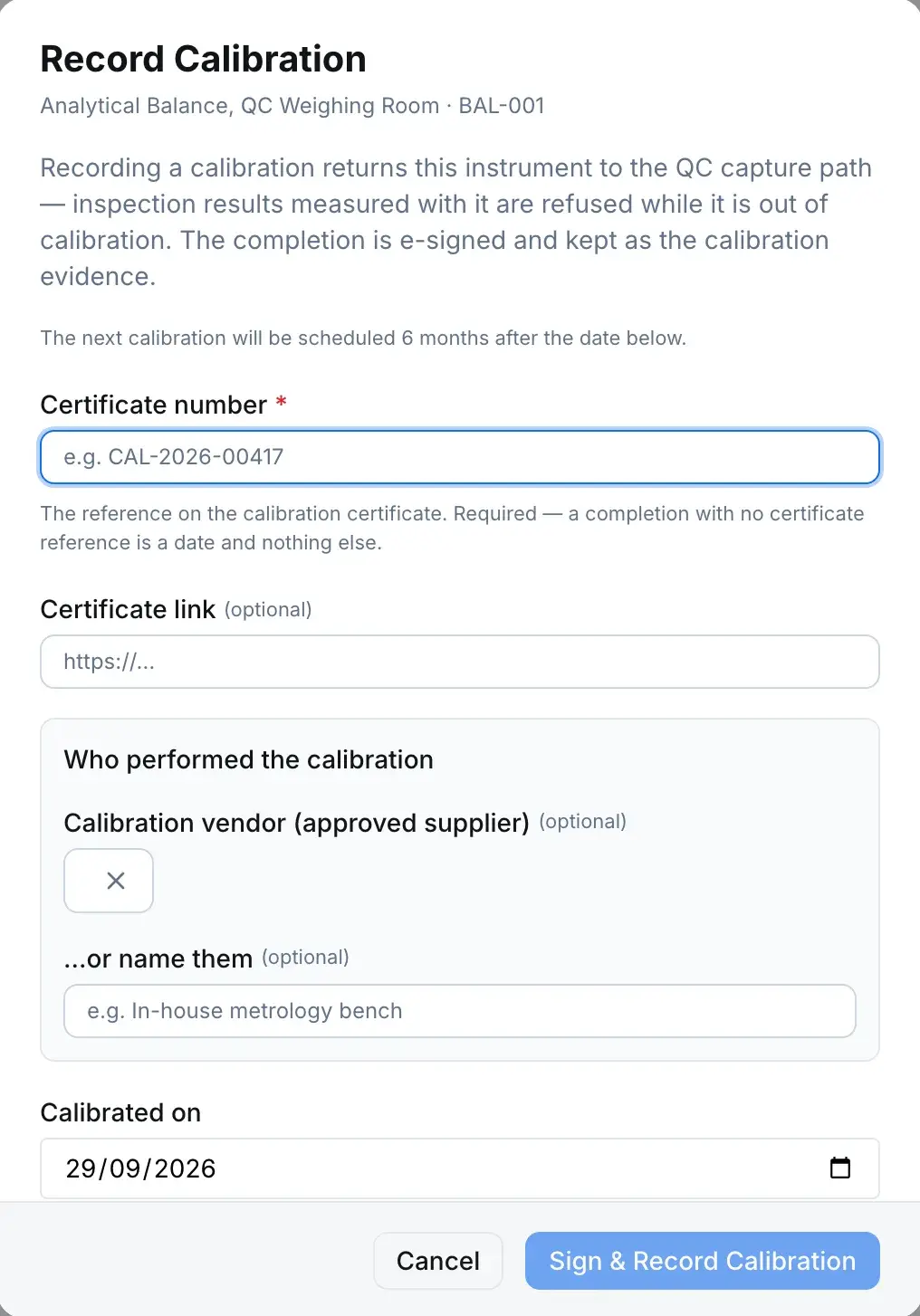
The instrument is in calibration
For a characteristic that needs an instrument, a missing or past calibration date refuses the result. Visual and attribute checks are never blocked.
Phase: In progress Server refusesHow the interlock clearsGate 4 · Complete refused until
Every characteristic has a result on every sample
The refusal says how many results are missing. Once complete, results are frozen. Changing one means reopening the lot.
Phase: In progress Server refuses
Under all four sits a trigger on the lots table. A direct write through the GraphQL API or the live-sync layer can’t change a lot’s status, phase or disposition at all, and the server’s own actions are held to the legal paths.
AQL says
The defect tally against Ac and Re gives a verdict. The reviewer sees it next to the results. It is advisory: it never sets the outcome.
- Accept
- Reject
QA decides
The reviewer on the lot’s approval workflow picks a disposition from your own list. The workflow engine writes it when they complete the task. Nobody sets it by hand, and it is e-signed where that step requires a signature.
Dispositionone per lot, from your list
An accepting disposition
The lot closes with the disposition and quality state recorded, and the disposition groups are sent the full result set.
Quarantine
The lot stays open, on hold, until QA reopens it for re-inspection.
An adverse disposition
QA can reopen it for re-inspection with a reason, or raise a draft nonconformance that carries the failed results and the inspection report. Nothing is raised automatically.
Sent back instead? The lot returns to In progress for the inspector to amend. A lot closed with an accepting disposition stays closed.
Calibration interlock
A lapsed instrument stops result capture.
Each instrument that is calibration-tracked carries a next-due date. Take a reading with it after that date, or before it was ever calibrated, and the result is refused, not flagged. Recording the calibration clears it: from the instrument register, or from a submitted calibration log entry on a log book set to roll the date forward.
- Recording a calibration is e-signed and needs the certificate number and who performed it
- A calibration log entry can roll the next-due date forward on its own
- Reminders go to the instrument owner and department supervisor, then the company owner once it is due
Retain samples
The evidence behind a release, kept until it may go.
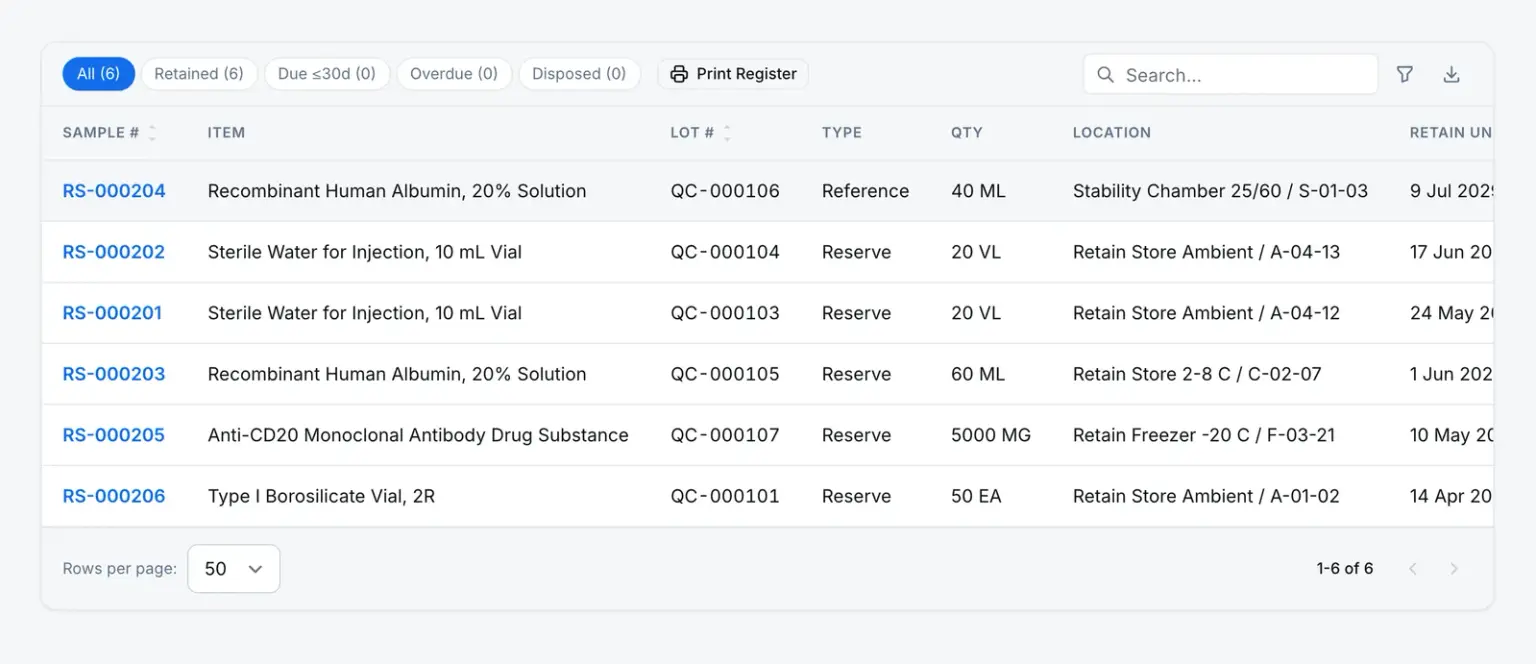
Retain a sample from a lot, with its quantity and storage location, and it gets a retain-until date: expiry plus twelve months by default. Thirty days before that date a disposal task lands with the person who retained it. Disposing is the one irreversible step, so it takes an e-signature recorded against the sample, and afterwards the disposal is sealed.
- Retained → Disposed is the only move, and a recorded disposal can’t be rewritten or erased
- Every custody change is logged as an event on the sample
- Filter the register by retained, due, overdue and disposed
Where it leads
A failed lot doesn’t end at the dock
What a lot raises keeps a link back to it, so the NC or quality event shows the inspection it came from.
Comes from — Inspection lot
Lots are raised at goods-in, on a production run or before shipment. An incoming lot names its supplier, PO and receipt, and keeps the supplier’s certificate of analysis on the record.
Leads to — Inspection lot
Quality eventRaised
An event raised from an inspection stays linked to the lot it came from.
NonconformanceOpened
A rejected lot opens an NC that carries the failed results and the inspection report.
Any NC, CAPA, change request, internal complaint, quality event, inspection lot, document or custom-module record can also be linked by hand as related.
The rules
What an inspection won’t let anyone do
- Change a lot’s status or disposition directly
- A trigger on the lots table refuses any change to status, phase, disposition or quality state that doesn’t come from the server’s own actions. Cancelled is final.
- Database refuses
- Undo a retain-sample disposal
- Retained → Disposed is the only transition. A disposal can only be recorded through the signed action, and once recorded it can’t be changed or erased, by anyone.
- Database refuses
- Approve a plan or spec without signing
- Approving a sampling plan or a specification asks for an e-signature, recorded against the plan or specification itself.
- Server refuses
- Raise two NCs from one lot
- Only a lot with an adverse disposition can raise a nonconformance, and only once. The draft NC names the lot, the item and each failed characteristic.
- Server refuses
- Your dispositions, plans and line clearance
- Disposition types, sampling plans, the approval workflow and whether line clearance is required are yours to set.
- You configure
Straight answers
What QC managers ask first
Does the sample decide whether the lot is released?
No. The AQL tally gives an accept or reject verdict that the reviewer sees next to the results, but it is advisory. The disposition is the reviewer’s decision, made on the lot’s approval workflow, and the workflow engine writes it when they complete their task.
Is a nonconformance raised automatically when a lot fails?
No. An adverse disposition offers a button to draft a nonconformance, pre-filled with the lot, the item and the failed characteristics, with the inspection report attached. Someone holding the right to raise an NC has to decide to press it. The NC starts as a draft so you can pick its workflow.
Is the disposition electronically signed?
Where the approval step is configured to require a signature, yes. It isn’t forced on every lot. Approving a specification or a sampling plan is always signed, and so is recording a calibration or disposing a retain sample.
Is there an equipment maintenance module?
Not in the CMMS sense. Instruments live in a register with calibration and maintenance due dates, reminders and signed calibration records, and that register drives the interlock. There are no work orders or spare-parts tracking.