Change Control
Nothing changes without a record.
A change request carries the problem that caused it, the reasons for it, the review that approved it, and a signed close or cancel. Its status moves only where the database allows.
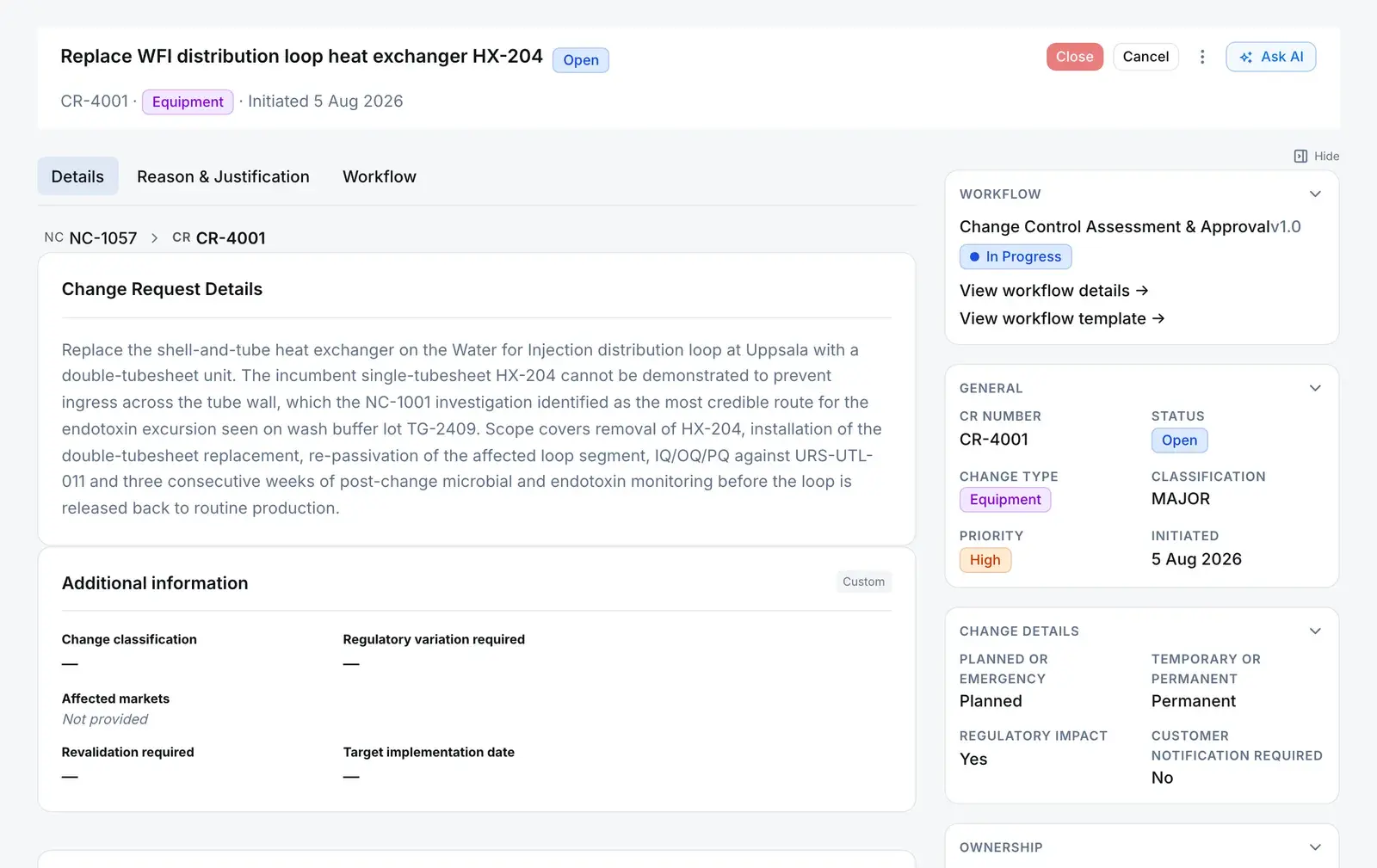
One change, end to end
A change carries its cause, its case and its signature.
Follow a single change request from the record that caused it to the signature that ends it.
01 · Origin
It starts from the problem that forced it.
Raise the change from a nonconformance or a CAPA and the link is written as the change is created. The change carries its origin for life, and the origin shows what it led to.
Drawn from the CR-4001 breadcrumb NCNC-1057CRCR-4001
- NonconformanceRaise the change from the NC. The link is stored as the change is created.
- CAPARaise the change from the CAPA. The link is stored as the change is created.
- Audit findingPoint the finding at the change it produced. The change shows the audit it came from.
02 · The request
It says what is changing, and why.
The reason and the business justification sit on their own tab, beside the change details a board decides on. In the app the form is editable only while it’s a draft, and the CR number is issued on first submit, so a draft that goes nowhere leaves no gap in the register.
The fields on a change request Reason & justification
- Reason for change
- Why the change is needed
- Business justification
- Why it is worth making
Change details
- Classification
- Minor, major or critical
- Planned or emergency
- Planned or emergency
- Temporary or permanent
- Temporary or permanent
- Regulatory impact · Customer notification
- Yes or no, each
03 · Review route
Your route reviews it.
The change runs on the same approval engine as documents, CAPAs and NCs: reviewers by role or by name, any-or-all approval, an SLA per step, and an e-signature wherever a step demands one. Every new company starts with impact assessment, an approval that each approver signs, then implementation as sub-tasks.
You configureCR-4129 · Approval steps 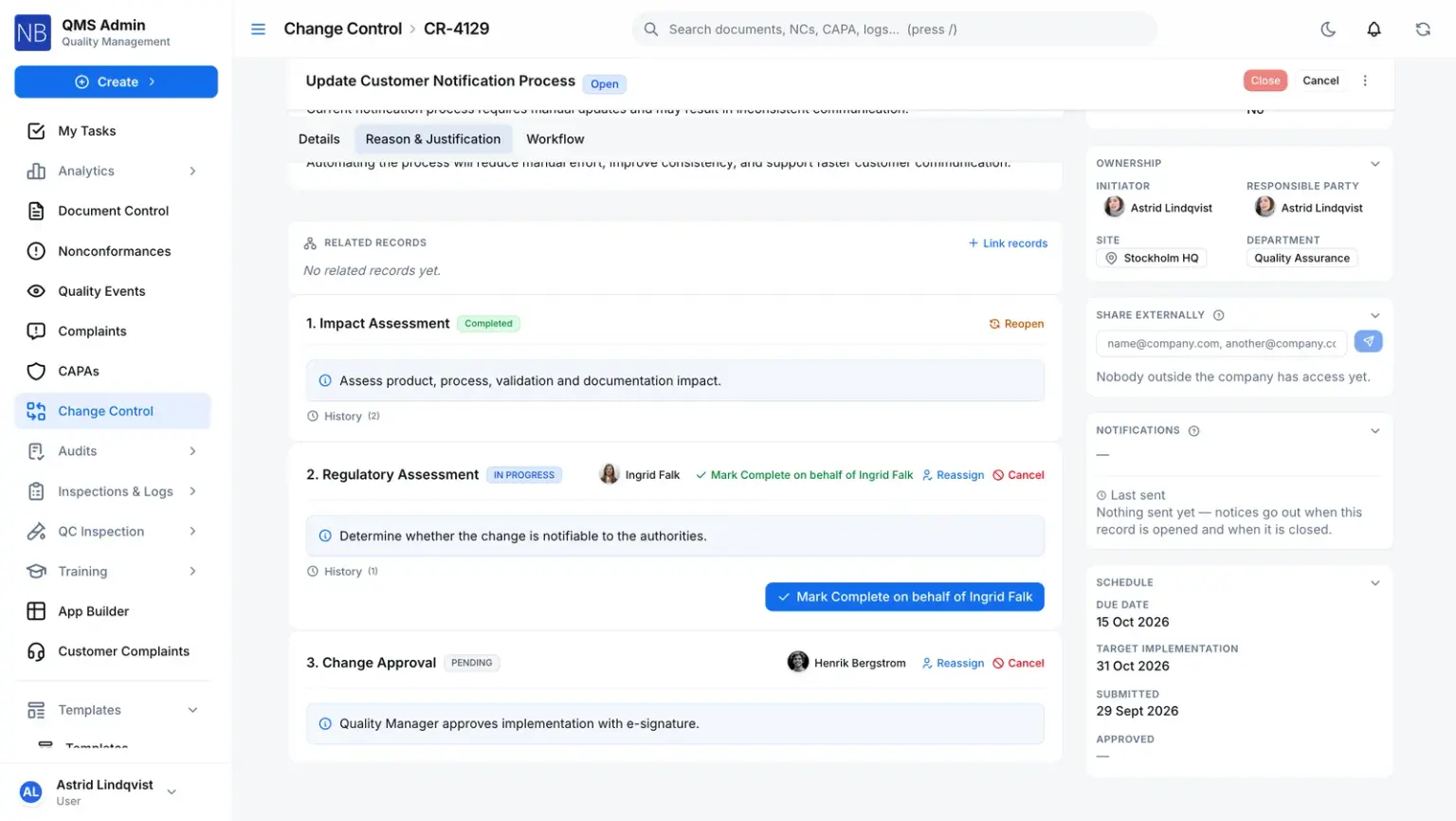
04 · Signed end
It ends one of two ways, and both are signed.
Closing or cancelling re-authenticates the person acting and writes a signature with the change request as its subject, in the same transaction as the status change. A rejected or sent-back review isn’t an end: it returns the change to draft.
Server refusesDrawn from the close and cancel checks Close Closed- Every step on the route finished
- Your role grants it on this change
- An electronic signature
Cancel Cancelled- A written reason
- Your role grants it on this change
- An electronic signature
05 · Linked by hand
What else it touches is linked as related.
A change request doesn’t keep a list of affected items. Link the documents, records and custom records it touches as related, and each link shows on both records.
What can be linked as related - Nonconformance
- CAPA
- Change request
- Internal complaint
- Quality event
- Inspection lot
- Document
- Custom-module record
Every change request moves only along
- Database refusesA client can create a draft and nothing else. Every status change comes from the server.
- Server refusesClose and cancel are both e-signed, with the change request as the signature’s subject
- Server refusesA rejected or sent-back review returns the change to Draft, and it keeps its number
- You configureApproval steps sign wherever your route demands it
Connected records
Where a change request comes from
Each link is stored, and visible from both records.
Comes from — Change request
Quality eventEscalated
Escalated to a change request instead, the change is created as a draft and both records show the link.
Audit findingRaised
The finding records the change it produced, and the change request shows the audit it came from.
NonconformanceCreated from
A change raised from an NC is linked to it, visible from both records.
CAPACreated from
A change raised from a CAPA is linked to it, visible from both records.
Leads to — Change request
Nothing is created from a change automatically.
Any NC, CAPA, change request, internal complaint, quality event, inspection lot, document or custom-module record can also be linked by hand as related.
The rules, and who enforces them
What a change request won’t let happen
- Status moves only along its lifecycle
- A trigger on the change requests table refuses any status change from a raw client, and any move outside the lifecycle from anyone. Cancelled has no way out.
- Database refuses
- No close while the route is running
- Close is refused unless the change is open and every step on its route is finished. A scheduled effectiveness check is the one step allowed to run on.
- Server refuses
- No silent cancel
- Cancelling needs a written reason and an electronic signature, and both stay on the record.
- Server refuses
- Closing and cancelling need the right
- Your role must grant it on this change at its scope. At the narrowest scope, that is the change’s owner or initiator.
- Server refuses
- A register without gaps
- The CR number is taken from a locked per-company counter on first submit, so two people can’t collide and an abandoned draft burns no number.
- Server refuses
- The history can’t be edited
- Every change to a change request is written to the audit log by a database trigger, and the audit log refuses updates and deletions.
- Database refuses
For your auditor
Only people with Manage Access on the module can share.
Share this record
- Send it to anyone outside your company — no account needed.
- They open it with a 6-digit code sent to their own inbox.
- They see a read-only summary with its attachments, not your whole record.
- The link expires after 30 days, and you can withdraw it at any time.
- Every open is logged, so you can see who looked and when.
Or bundle it for an audit
For an external audit, collect effective documents and quality records into one Audit Records Package — one link and one code for each auditor.
Straight answers
The questions a change board asks first
Can a change request be edited while it is being reviewed?
Not in the app. The form is editable while the change is a draft. Once it’s open, a reviewer who wants something altered sends it back, which returns it to draft for the owner to fix and resubmit.
What exactly is signed?
Closing and cancelling, always. Each writes a signature against the change request, and a cancel carries its reason. Approval steps inside the route are signed too wherever the step demands it, as the approval step in the starting route does.
Does a change request list the documents it affects?
Not as a structured list today. Link the documents and records a change touches as related, and each link shows on both records. The record a change came from is linked automatically when you raise it from an NC or CAPA.
How does a CAPA turn into a change?
Raise the change request from the CAPA or the nonconformance. The link is written as the change is created, so the change carries its origin and the origin shows what it produced. Neither depends on someone remembering to mention the other.
Does the system track implementation after approval?
Yes, as sub-tasks on the change request’s own route, so the work sits on the record. Where a change needs its effectiveness proven, run that verification as a CAPA, which has a scheduled effectiveness check.