Security
Every control, with its evidence and its limit.
Written for the person answering the vendor questionnaire. Each control below is in the product today, with where to see it and what it doesn’t cover.
Control inventory
Controls by domain. How each works, where to see it, and where it stops.
Identity and sign-in
Who can get in, and how they prove it.
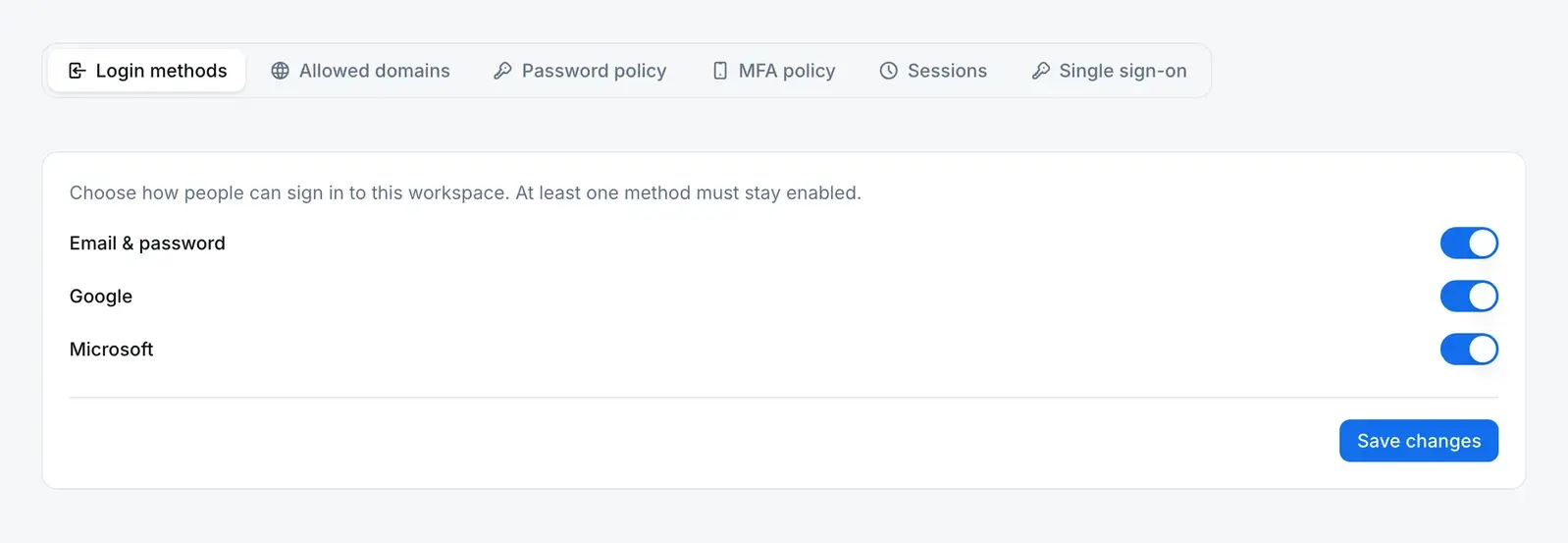
| Control | How it works | Where to see it | Limit |
|---|---|---|---|
| Sign-in methods | Email and password, Google, or Microsoft. An admin chooses which are allowed, and the server refuses a sign-in by a method you have turned off. | Organization Security › Login methods You configure | Single sign-on to your own identity provider is not described here. Ask us. |
| Password policy and lockout | Your policy sets length, character mix, a strength score, reuse history and expiry. Repeated wrong passwords lock the account for a set time. | Organization Security › Password policy Server refuses | The known-breach check calls a public breach list and is skipped if that service can’t be reached. |
| Multi-factor authentication | An authenticator app, with one-time recovery codes. Authenticator secrets are encrypted before they are stored. | Organization Security › MFA policy Server refuses | Emailed codes are not offered as a second factor, because a mailbox is usually the password-reset channel too. |
| MFA policy | Optional, required for admins, or required for everyone, with a grace period to enroll. It is checked at sign-in. | Organization Security › MFA policy You configure | Optional until you set it. |
| Session limits | Idle and absolute timeouts per company (30 minutes and 12 hours by default). People see their own sessions and sign-in history and can end them. | Organization Security › Sessions; Security › Active sessions Server refuses | A “remember me” sign-in lasts longer; you can turn it off. |
Access control
What each person may do once they are in.
| Control | How it works | Where to see it | Limit |
|---|---|---|---|
| Roles by module, action and scope | A role grants actions per module, each at a scope: own, department, site or company-wide. The server asks one permission function in the database before acting. | Settings › Roles Server refusesGovernance | Own, department and site scopes exist only where the record carries that field. |
| Permission change ledger | Each grant, revoke, scope change or new admin is written with the actor, old and new scope, reason and IP. The database refuses edits and deletes to it. | Roles › Access history Database refuses | Grants written by initial setup or App Builder promotion are not ledger events. |
| Admin security actions | Admins can unlock an account, reset its MFA, force a password reset or sign-out, and suspend or reactivate a user. Sign-in events are append-only. | Settings › Security Center You configure | Deciding when to use them is part of your access procedure. |
Tenant isolation and transport
Keeping one company’s records away from another’s.
| Control | How it works | Where to see it | Limit |
|---|---|---|---|
| Company scoping on the server | Each company-scoped request resolves your company from the session, checks your membership, and scopes its queries to that company. | Server checks, shown in a technical walkthrough Server refuses | A server-side check. The row-level policies below add a second layer on the GraphQL path. |
| Row-level security | The GraphQL data layer runs as a restricted database role, under PostgreSQL row-level security policies on company-scoped tables. | Database policies, shown in a technical walkthrough Database refuses | REST endpoints rely on the server checks above. Row-level security is not switched on for that path by default. |
| Encrypted in transit | The app is served over HTTPS; plain HTTP is redirected. | Your browser’s certificate details Server refuses | We don’t publish encryption-at-rest or key-management claims yet. |
Records and audit trail
What happens to a record after it is written.

| Control | How it works | Where to see it | Limit |
|---|---|---|---|
| Change capture | A database trigger on each company-scoped table queues every insert, update and delete, with the user and IP, as part of the change. A worker then writes the entry with the before and after values. | Audit Logs; each record’s history Database refusesAudit trail | Records the fields tracked for each table, not every column. Reads are not logged. The entry is written just after the change. |
| Append-only audit log | The database refuses any update or delete to an audit entry. | An entry has no edit or delete control Database refuses | Entries are not hash-chained. |
| Lifecycle guards | Nonconformances, CAPAs, change requests, documents, quality events, complaints and audits move only along their own states. The database refuses any other move. | Ask to see a refused move in a demo Database refuses | The guards cover the status, not the content of other fields. |
Electronic signatures
Proving who signed, and what they meant.
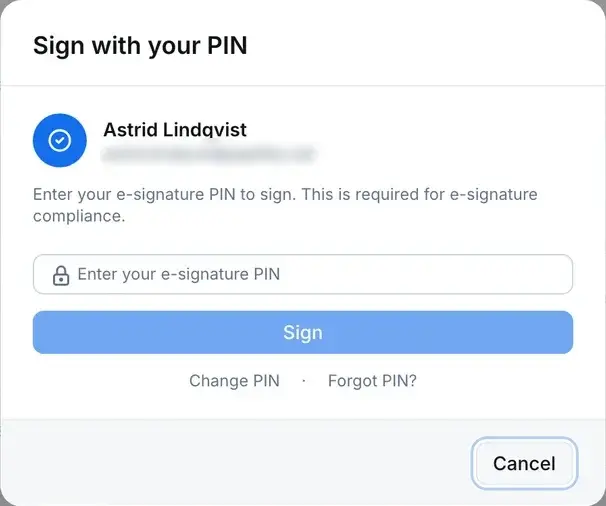
| Control | How it works | Where to see it | Limit |
|---|---|---|---|
| Re-authentication with a signature PIN | At every sign-off point in the app, the signer re-enters a signature PIN that is separate from the login password and stored only as a hash. Five wrong PINs lock signing for 15 minutes. | The signing dialog Server refuses | Keeping PINs personal is part of your signature procedure. |
| The signature record | Each signature stores its meaning, time, IP, browser and a SHA-256 hash of the signing details. A database constraint binds it to exactly one record. | The record’s approvals and its printed copy Database refuses | The hash covers who, what, when and where, not the record’s content, and isn’t re-checked automatically. A signature can be revoked with a reason; nothing in the app deletes one. |
People outside your company
Auditors, suppliers and integrations.
| Control | How it works | Where to see it | Limit |
|---|---|---|---|
| Protected share links | A shared record opens only with the link plus a one-time code sent to the address on the share. Codes last 10 minutes and burn after five wrong tries; links last 30 days. | Settings › Shared Records Server refuses | Anyone who controls that mailbox can open the share. |
| Supplier logins | Supplier users are invited with no roles, and see their own supplier’s requests and documents plus what you share with them. | A supplier’s Users tab Database refusesSuppliers | Someone with user-management rights can still give a supplier login a role. |
| Service accounts for integrations | An integration uses an API key owned by a service account, which has its own roles, no email and no password. Its changes are attributed to it in the audit trail. | Settings › Service Accounts You configure | No published public API reference yet. |
Straight answers
What we don’t offer (yet). Better you read it here than find it in a review.
SOC 2 or ISO 27001 attestation. We have no audit engagement today.
A third-party penetration test report. None to share yet.
Backup and disaster-recovery commitments. We don’t publish recovery point or recovery time objectives.
An uptime figure or SLA. We don’t publish one.
Encryption-at-rest and key-management statements. Not published. Transport is HTTPS, as above.
Self-hosted or dedicated deployment. QAbility runs as a shared, multi-company service.
Automated user provisioning (SCIM). Accounts are invited and managed in the app.
A public API reference and outbound webhooks. Integrations run through service accounts we set up with you.
No dates are promised here. Single sign-on to your own identity provider is a conversation: ask us where it stands for your setup.