Quality Events
Filing a signal is quick. Deciding what it becomes is on the record.
Deviations, near-misses, operator observations, supplier issues and QC findings from an inspection lot all land in one place, routed to a named reviewer. The reviewer closes it as a documented observation, or raises the record it deserves and keeps the two linked. Closing and cancelling are signed actions with conditions, not values in a dropdown.
From signal to outcome
Many signals in. One reviewer decides.
Filing is light, and the server does the bookkeeping. The event then waits on one person, and it ends in one of two signed ways. Escalating is not one of them.
The moment an event is filed
- NumberedEV-000123
- Routed
- Clocked
- Queued
The assigned reviewer decides
OpenNotes, files and the three review fields are ordinary work on an open event. Only the reviewer it was routed to can close it or escalate it.
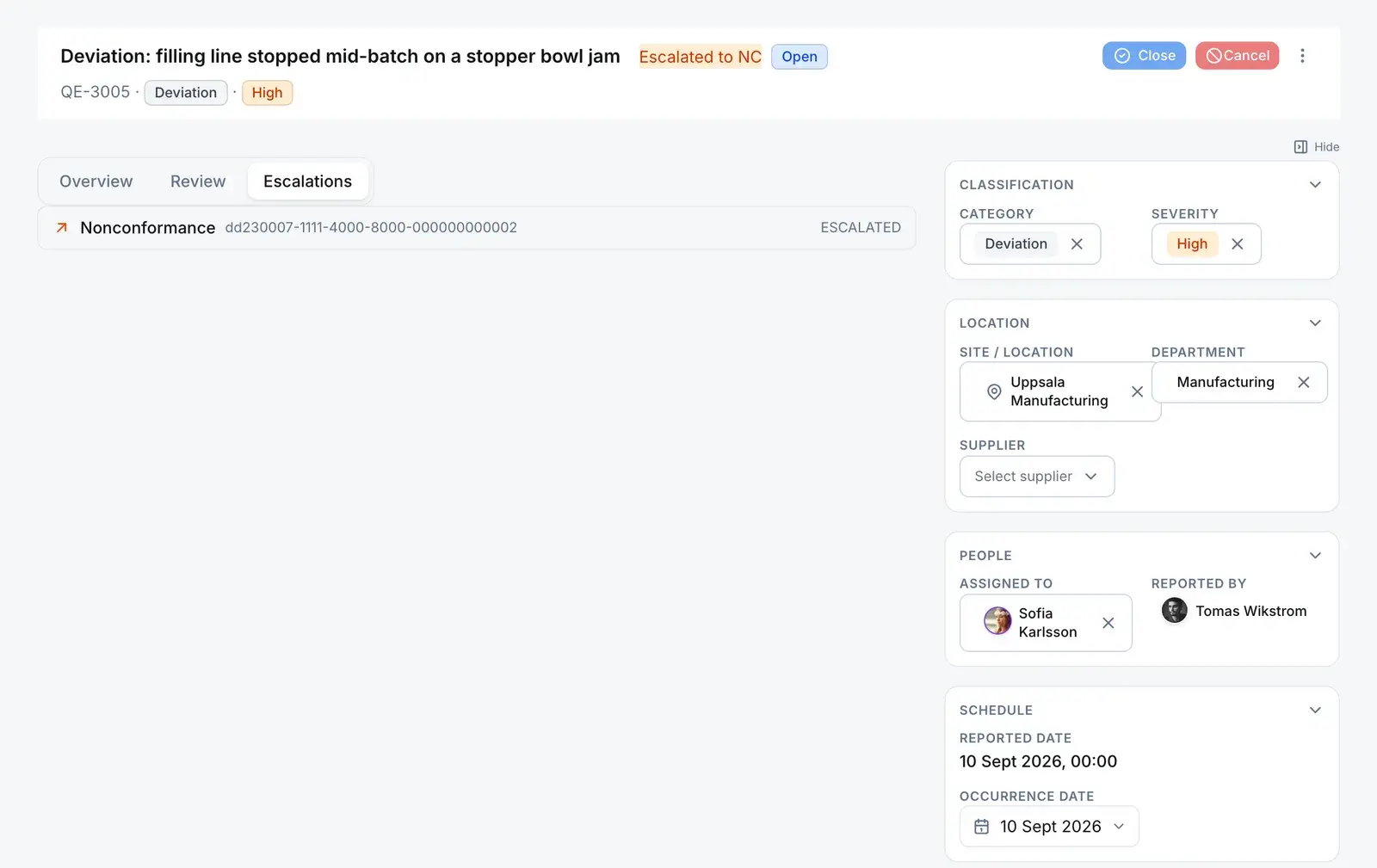
Side-link · not a status
Escalate
Creates the record the event needs, copying its title, description, site and department across, and writes the lineage link in the same transaction.
Creates exactly one of
- Only the assigned reviewer, and never from a closed or cancelled event
- Once per event. A second try is refused and names the record that exists
- An audit entry names what was raised
The event stays Open, with the link on both records. It still ends through Close or Cancel, signed.
The event ends one of 2 ways:
Close
ClosedThe signal is answered, as a documented observation or because its linked record now carries the work.
Refused unless
- You are the assigned reviewer
- The event is Open
- Review summary, recommended action and decision contain real text
- Your electronic signature, recorded against the event before the status moves
Server refusesCancel
CancelledA duplicate, a mis-filed report, or nothing to answer. Works from Draft or Open.
Refused unless
- You are the assigned reviewer, if the event has one
- A written reason
- Your electronic signature with that reason, recorded against the event
Server refuses
Every quality event moves only along
- Database refusesStatus moves only through submit, close and cancel. A direct write through the GraphQL API is refused.
- Database refusesClosed and Cancelled are final for every caller, the server’s own code included.
- Server refusesClose and cancel are e-signed and written to the signature ledger against the event.
- Escalating adds a link, shown as an “Escalated to …” marker beside the status. It never changes the status.
The decision
Closing is an action with conditions, not a status you pick
The review tab of an open event, filled in and ready to close. Nothing moves until the reviewer signs.
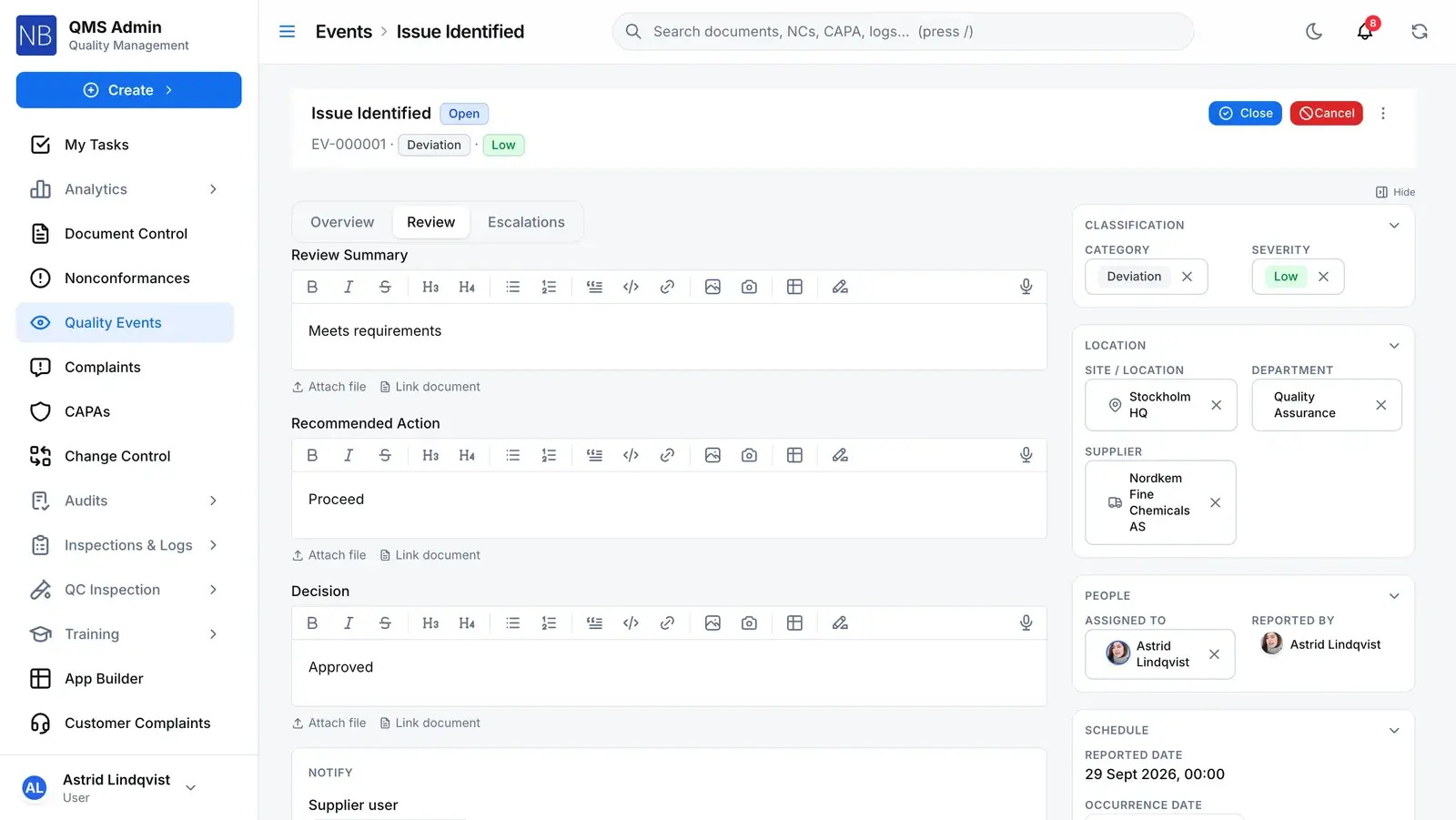
Three required fields
Review summary, recommended action and decision. Each is checked for real text before a close, so an empty editor or bare markup does not count.
Still Open
The status chip is not an editable field. Only submit, close and cancel move it.
Close
The only way to Closed. The reviewer re-authenticates, and the signature is recorded against the event before the status changes.
Assigned to
The one person who can close or escalate this event. Reassigning retires their review task and gives the new reviewer one.
Where it leads
Where the quality chain usually starts
An event is often the first record of a problem. What it raises keeps a link back to it, so the NC or CAPA shows where it came from.
Comes from — Quality event
Inspection lotRaised
An event raised from an inspection stays linked to the lot it came from.
Leads to — Quality event
NonconformanceEscalated
The event records the NC it was escalated into, by whom and when, and the NC shows the event that caused it.
CAPAEscalated
Escalated straight to a CAPA instead, the event’s severity becomes the CAPA’s priority, and both records show the link.
Change requestEscalated
Escalated to a change request instead, the change is created as a draft and both records show the link.
Any NC, CAPA, change request, internal complaint, quality event, inspection lot, document or custom-module record can also be linked by hand as related.
The rules
What cheap intake does not let anyone do
- Close or escalate someone else’s event
- Close and escalate are refused for anyone but the assigned reviewer. Being able to edit the event is not enough.
- Server refuses
- Close with empty review fields
- Review summary, recommended action and decision must each contain text once the markup is stripped. A blank editor is refused by name.
- Server refuses
- Leave a half-closed event
- The signature is verified and recorded before the status write, in the same transaction. A refused signature leaves the event exactly as it was.
- Server refuses
- Escalate the same event twice
- An event that already links to a downstream record is refused, and the refusal names that record. No two NCs for one signal.
- Server refuses
- File an event nobody owns
- If no reviewer can be resolved from the event, filing is refused with the reason, rather than creating an unassigned event.
- Server refuses
- Your categories and your review SLA
- Categories and severities are your own lists. The review due date comes from a company setting you choose.
- You configure
For your auditor
Only people with Manage Access on the module can share.
Share this record
- Send it to anyone outside your company — no account needed.
- They open it with a 6-digit code sent to their own inbox.
- They see a read-only summary with its attachments, not your whole record.
- The link expires after 30 days, and you can withdraw it at any time.
- Every open is logged, so you can see who looked and when.
Or bundle it for an audit
For an external audit, collect effective documents and quality records into one Audit Records Package — one link and one code for each auditor.
Before you trust the intake
What evaluators ask about a cheap intake form
What stops someone setting an event to closed from the status control?
A trigger on the quality events table. Nothing outside the server’s own actions can change an event’s status, and that includes a direct GraphQL write. Closed is reachable only through the close action, which checks the assigned reviewer, the three review fields and the electronic signature. Cancelled is reachable only through the cancel action, which requires a reason and a signature.
Can a closed event be reopened?
No. Closed and Cancelled are terminal, and the trigger refuses every transition out of them whoever is asking, the server’s own code paths included. If the problem comes back, file a new event. If it needed more than an observation, that is what the linked nonconformance, CAPA or change request is for.
What happens to the event when it is escalated?
It stays open. Escalating creates the nonconformance, CAPA or change request as a draft, writes a link between the two records and records what was raised in the audit trail. It does not change the event’s status or close it for you. Each event can raise one downstream record.
Where is the approval workflow?
There isn’t one on a quality event, and that is deliberate. An event has one assigned reviewer, no multi-step review and no approval routing. The ceremony belongs to the record it raises: the nonconformance, the CAPA and the change request each run their own approval workflow. If your process needs a second approver on an observation, raise the downstream record.
Does the system chase overdue events?
Not yet. Each event is stamped with a review due date from your SLA setting, but no reminder fires on it today. The reviewer’s open review task is the working queue.