Governance & Administration
One model decides who can do what. It is consulted on every request.
Roles, a permission matrix, scope and group membership, read inside the database on each request rather than baked into a session at sign-in. Change what someone may do and their next request already knows.
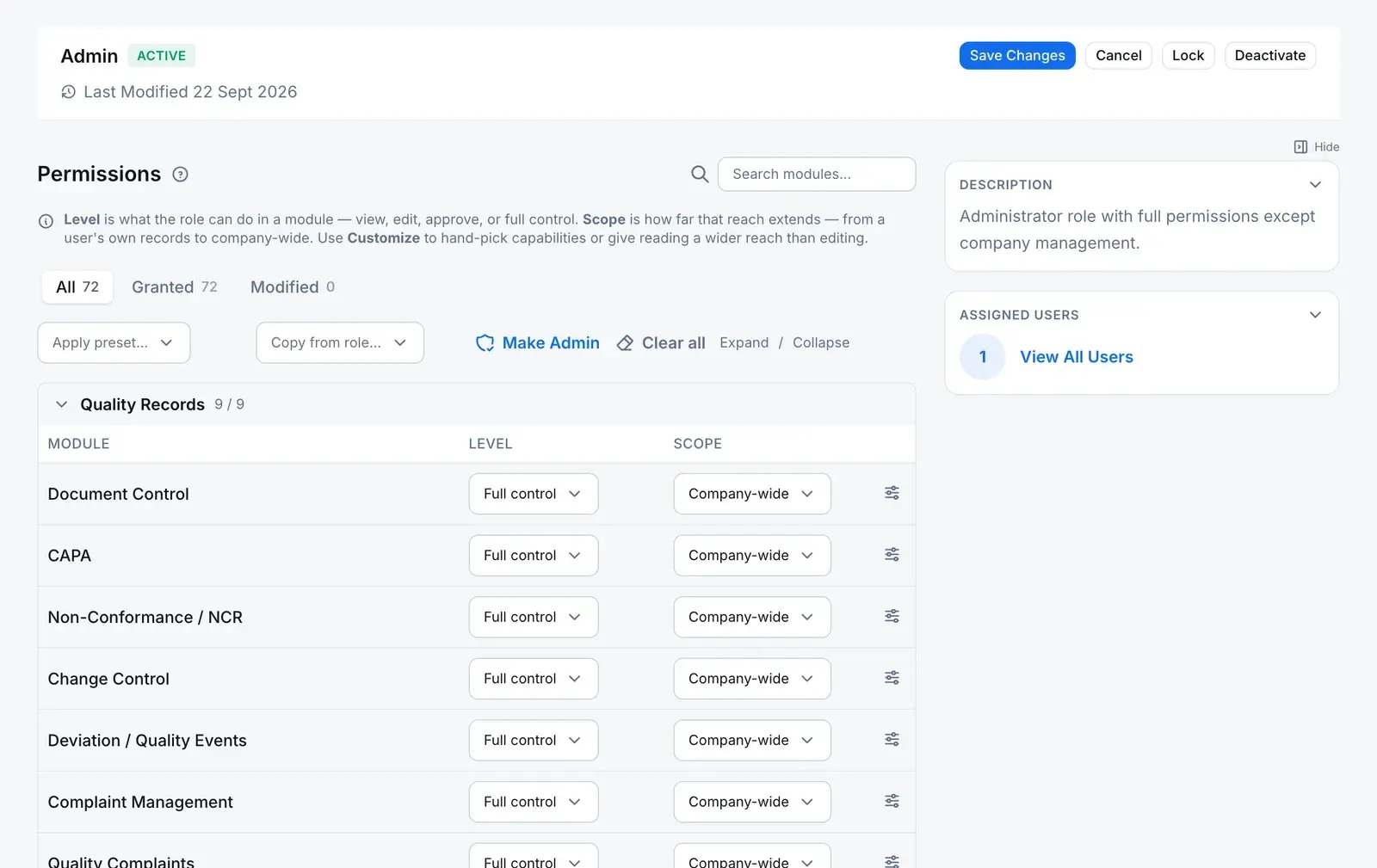
The model
Every permission is four answers.
Who holds it, over what, to do what, and how far it reaches. Every authorization question anywhere in the product resolves back to this.
Role
Who holds it
A named bundle of grants, held by people directly or through a group. Switch it off and it stops granting; the assignments stay.
Module
Over what
A capability of the product, from document control to a record type you built yourself.
Action
To do what
Read, create, update, approve, close, manage access and more. Only an action the module supports can be granted on it.
Scope
How far
Own, Department, Site or Company-wide. A field on the grant, never encoded in a permission name.
One grantAcross all of a person’s roles, the widest grant for an action is the one that counts.
Scope, drawn as it nests
- Company-wideEvery record in the company.
- SiteRecords at any site assigned to the person: a primary site plus any number of additional ones.
- DepartmentRecords in the person’s department.
- OwnRecords the person owns.
The narrow tiers exist only where the record carries the column. The roles matrix offers Own, Department or Site on a module only when its records have an owner, a department or a site to check. Everywhere else, mostly reference data, it offers Company-wide alone rather than a narrower choice that would quietly deny.
Two ways to hold a role, one check
Direct
RolePerson
Assigned from the role, or from the person’s own record.
Database refusesVia a group
RoleGroupPerson
Grant a role to a group and every current and future member holds it. Nothing is copied onto the person; the membership is followed at the moment of the check.
Database refuses
The check
Both paths are read live, by the server and by row-level security in the database. Only active roles count, and nothing is cached at sign-in, so a change applies on the person’s next request.
Database refusesEvery row is one of
- Grant
- Scope change
- Revoke
- Make admin
- Role
- The role whose grants changed.
- Module and action
- What the grant covers.
- Scope before and after
- Both ends of the change.
- Changed by
- The person who made it.
- From
- The network address of the request.
- When
- The moment it was written.
Written by the same database function that makes the change, in the same transaction. Editing or deleting a row afterwards is refused, including for the administrator who made it. Database refuses
Placement is an input
Sites and departments decide what a scope reaches
A person’s site and department are not profile decoration. They are the values the Site and Department tiers check a record against.
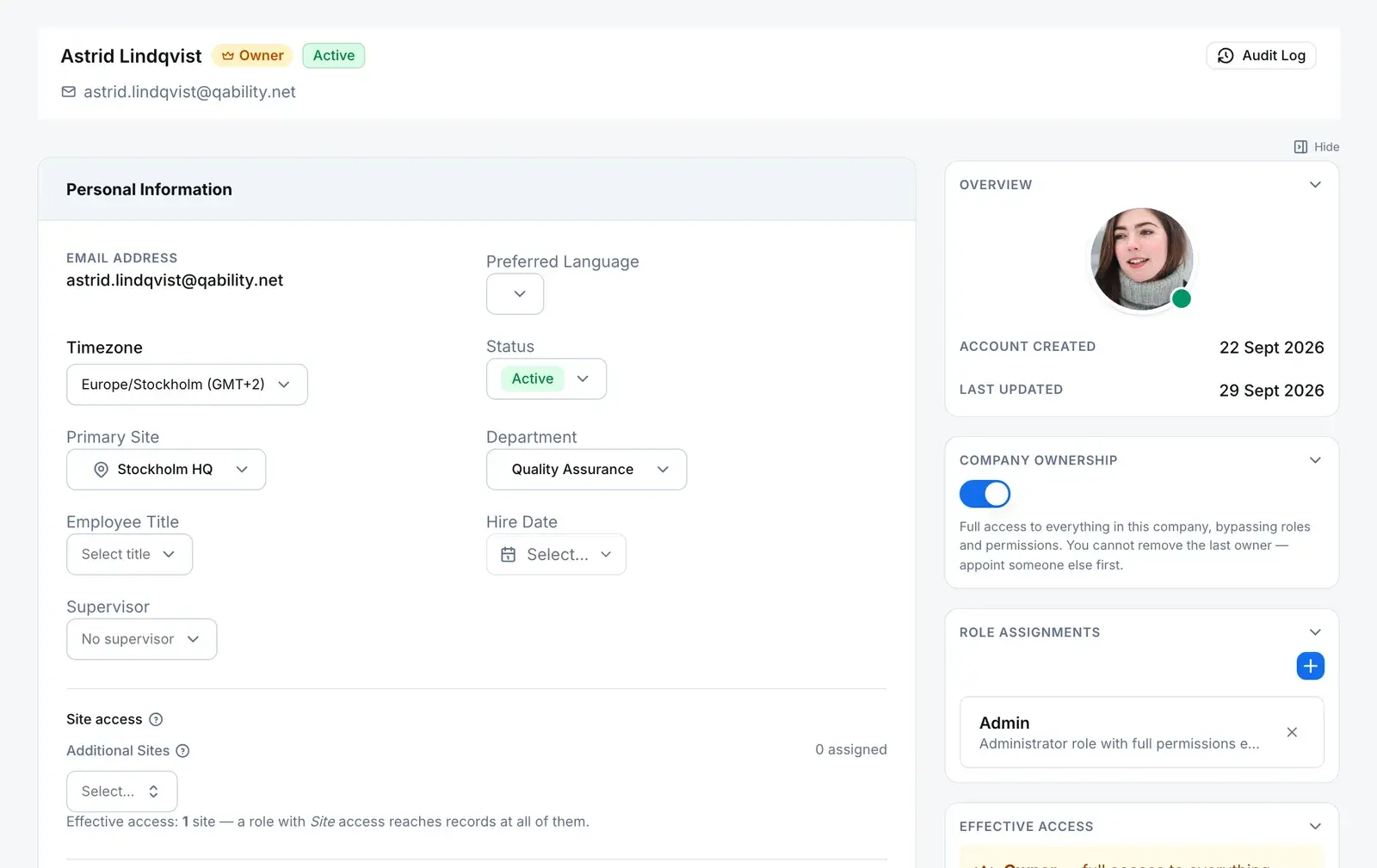
Primary site
Where the person sits. A Site-scoped grant reaches records at this site.
Department
The value a Department-scoped grant checks a record’s department against.
Additional sites
Any number more. A role with Site scope reaches records at every one of them, as the line beneath the field says.
Role assignments
Roles held directly. A role that arrives through a group shows on the person’s effective permissions, with the group named.
Company ownership
An owner bypasses roles and permissions entirely. Keep owner accounts few and named.
The rules, and who enforces them
What an access change won’t get past
- Managing permissions is its own right
- Changing the matrix, assigning a role to a person or granting one to a group needs the right to manage permissions, or company ownership. Being allowed to administer users or groups is not enough.
- Database refuses
- One door into the matrix
- The app’s database role can read the matrix but not write it. Every change goes through one function that checks that right, refuses another company’s roles, and refuses an action the module does not support.
- Database refuses
- The ledger is append-only
- A trigger refuses every update and every delete on the permission ledger, whoever asks.
- Database refuses
- A switched-off role grants nothing
- The check reads active roles only, so deactivating a role removes its grants on the next request. Every assignment stays in place for when it is switched back on.
- Database refuses
- A locked role stays as it is
- Renaming, deactivating or deleting a locked role is refused by a trigger, and saving its permissions is refused by the server until someone unlocks it.
- Database refuses
- Narrow scope only where it takes effect
- The matrix offers Own, Department and Site only on modules whose records carry that column, so no one stores a grant that would silently deny.
- Server refuses
Straight answers
The questions a security reviewer asks first
Do you support SSO, SAML or SCIM?
Not SCIM, and we would rather you read that here than find it in a questionnaire: there is no directory provisioning, so people, roles and group membership are administered inside QAbility. For SAML single sign-on, ask us about availability for your tenant before you plan around it. Multi-factor authentication, the sign-in policy and session controls sit at the identity layer rather than this one; the security page covers them.
If I change someone’s permissions, when does it take effect?
On their next request. Roles, grants and group membership are checked live, by the server and by row-level security in the database, with no decision cached at sign-in, so nothing has to expire and nobody has to sign out. The same holds for removing a role from someone, switching the role off, or taking them out of a group whose roles they relied on.
Can I prove who changed what someone was able to do?
Yes. Every change made in the roles matrix records the event, the role, the module and action, the scope before and after, who made it, from which address and when, in a ledger that refuses edits and deletes. A role’s access history merges those changes with who was assigned the role, directly or through a group. Two limits, stated plainly: grants the system writes at setup, such as a new company’s starting roles and the first grants on a module you build, are not ledger events; and no access change is electronically signed, because there is no signature subject for a role or a membership.
Can I see where a person’s permission comes from?
Yes. The effective-permissions view on a person lists each grant with the role it comes from, and when the role arrives through a group, it names the group. That is the question an access review actually asks, answered without reading two tables side by side.
Do the four scope tiers apply everywhere in the product?
No, and the matrix does not pretend they do. Own, Department and Site work wherever the module’s records carry an owner, a department or a site. Modules without that column, mostly reference data and record types you build yourself, offer Company-wide alone. Company-wide always applies; the narrow tiers appear only where they take effect.
Can an administrator grant more than they hold themselves?
Yes. Anyone with the right to manage permissions can grant any action at any scope the module offers; there is no check that limits them to their own reach, and no second approver on a permission change. Treat that right as the most sensitive one in the product, give it to few people, and review the ledger.