Quality Complaints
Decide reportability on the record, not in an inbox.
A quality complaint is a numbered file with an owner and a review workflow that starts the moment it is logged. QA records the assessment on the file itself, and every change to it lands in the audit trail. When a complaint needs an investigation, it becomes a nonconformance in one linked step.
The complaint file
One lane, two ways out
A complaint stays Open while it is assessed and reviewed. It leaves closed on the record, or converted into a nonconformance, and conversion closes it too.
Stage 1: Whoever logs it
Intake
Logged against the product, lot and customer, and classified from your own lookup lists. An imported complaint is accepted by someone, who becomes its owner.
Stage 2: QA, on the file
QA assessment
Risk level and the reportability call are recorded on the complaint itself. A database trigger writes every change to them into the audit trail, with who and when.
- Regulatory reportable
- Safety issue
- Compliance related
- Potential recall
- Repeat / recurring issue
Stage 3: The owner, then an approver
Review workflow
Your complaint review workflow starts when the complaint is logged. Action steps go to the owner and approval steps to the owner’s department supervisor.
The complaint leaves the lane one of 2 ways:
Closed
ClosedApproving the final workflow step closes the complaint. The owner can also close it once no step is left open.
Server refusesRefused while any workflow step is still open. Only a scheduled effectiveness check may run on after the close.
Converted to an NC
ClosedSelect one complaint or several and convert. One transaction creates the nonconformance, links each complaint to it and closes each complaint.
Creates Nonconformance Draft
Server refusesRefused for any complaint that already has a nonconformance linked.
On the record
The assessment and the sign-off sit on the complaint
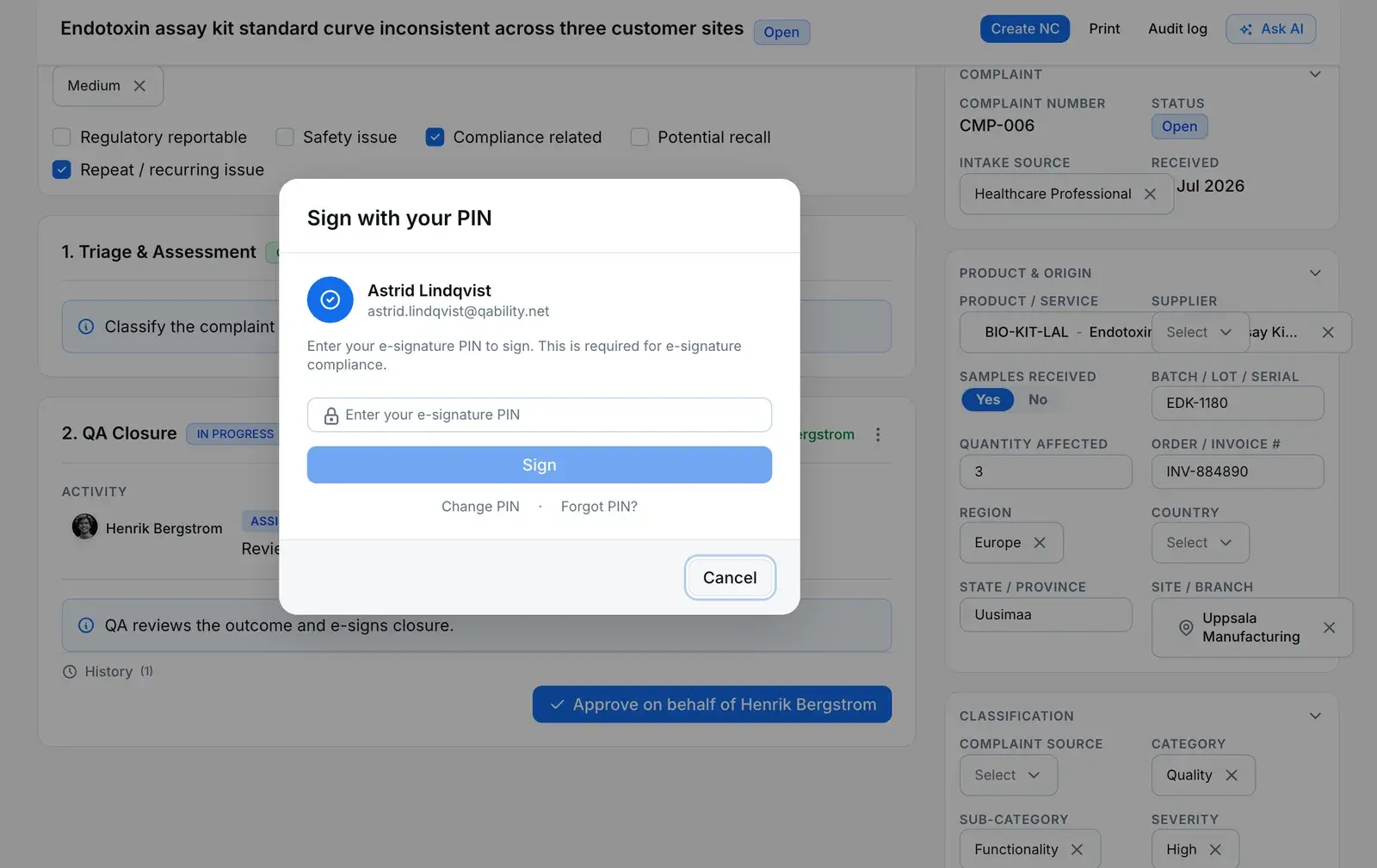
A complaint mid-review: QA has flagged it, and the approver is signing the closure step of the review workflow.
The QA assessment
Regulatory reportable, safety, compliance, recall and repeat, set on the file. Here QA has ticked compliance related and repeat issue.
Number and status
CMP-006, Open. The status moves only through the server’s actions, never through the field.
A signed workflow step
The QA Closure step asks the approver for their PIN. That signature is recorded against the workflow step, not the complaint.
Create NC
Conversion starts from the complaint itself, and the new NC is linked back to it.
Convert to NC
What conversion writes, in one transaction
If any part of it fails, none of it is written.
A draft nonconformance
With its own NC number and a customer-complaint source. Unless you write one, its description lists the complaints it came from.
A link per complaint
A record link from each complaint to the NC, visible from both sides, so the NC shows every complaint it answers.
Each complaint closed
Conversion is a link, not a status. Each converted complaint moves to Closed, and a second conversion is refused.
An audit entry each
Each complaint’s trail names the NC it went into. The NC’s own entry lists the complaints it came from.
Where it leads
A complaint leads to a nonconformance, and only that
There is no complaint-to-CAPA button. The nonconformance holds the evidence and the disposition, and raises the CAPA when the investigation supports it.
Comes from — Complaint
Complaints start here: logged by your team, or accepted from an import.
Leads to — Complaint
NonconformanceConverted
A complaint converted to an NC stays linked to it — and several complaints can feed the same NC.
Any NC, CAPA, change request, internal complaint, quality event, inspection lot, document or custom-module record can also be linked by hand as related.
The rules
What a complaint will not let you do
- Edit the status directly
- A trigger on the complaints table refuses any status change that does not come from the server’s own actions, including a direct write through the GraphQL API.
- Database refuses
- Close with the workflow unfinished
- Closing is refused while any workflow step is still open. The only step allowed to outlive the close is a scheduled effectiveness check.
- Server refuses
- Convert the same complaint twice
- A complaint that already links to a nonconformance is refused, and the refusal names it. One pattern converts once.
- Server refuses
- Change the reportability call quietly
- Every change to the complaint row, the five assessment flags included, is written to the audit trail by a database trigger.
- Database refuses
- Delete without the delete permission
- Removing a complaint needs the complaints delete permission. The database checks it, not only the screen.
- Database refuses
- Your workflow, your approvers
- The review workflow is a template you edit. Approval steps go to the owner’s department supervisor. If none is set, the step waits unassigned and the audit trail records why.
- You configure
For your auditor
Only people with Manage Access on the module can share.
Share this record
- Send it to anyone outside your company — no account needed.
- They open it with a 6-digit code sent to their own inbox.
- They see a read-only summary with its attachments, not your whole record.
- The link expires after 30 days, and you can withdraw it at any time.
- Every open is logged, so you can see who looked and when.
Complaints aren’t included in the Audit Records Package — share them one at a time.
Complaint handling, plainly
What a complaint owner asks before switching
Can a complaint be turned straight into a CAPA?
No, and that is deliberate. A complaint converts to a nonconformance: a draft NC with a record link back. The nonconformance raises the CAPA once the investigation supports it. The app has no complaint-to-CAPA conversion, so nobody opens a corrective action on a complaint that has not been investigated yet.
Is closing a complaint electronically signed?
Not the close itself, and we will not claim otherwise. The signature ledger has no complaint subject, so a close is an audited action, not a signed one. What can carry a signature is the review workflow. The default complaint review ends in an approval step that asks the approver to re-authenticate, and that signature is recorded against the workflow step. A template you build signs only where its steps ask for it.
Does QAbility file the regulatory report?
No. The complaint records whether it is regulatory reportable, next to the safety, compliance, recall and repeat flags, and the audit trail records every change to that call. Making the submission to the regulator stays with you.
What happens when the same problem comes back?
Log it as a new complaint and link it to the earlier ones as similar. A “more like this” search ranks existing complaints by their text, so you can find the matches. When the pattern needs an investigation, convert the whole set into one nonconformance.
Where is the customer support desk?
Customer tickets live in a separate module, Complaint Management, with its own records, its own permission and its own statuses. This page covers the quality complaint file. Ask us about the desk in a demo.