Skip to content

Audit Management

Every audit scheduled. Every finding accounted for.

Recurring internal, external and supplier audit programs that mint their own audits, run clause by clause against a versioned standard, and refuse to go to close-out while a finding is still open or a clause has no verdict.

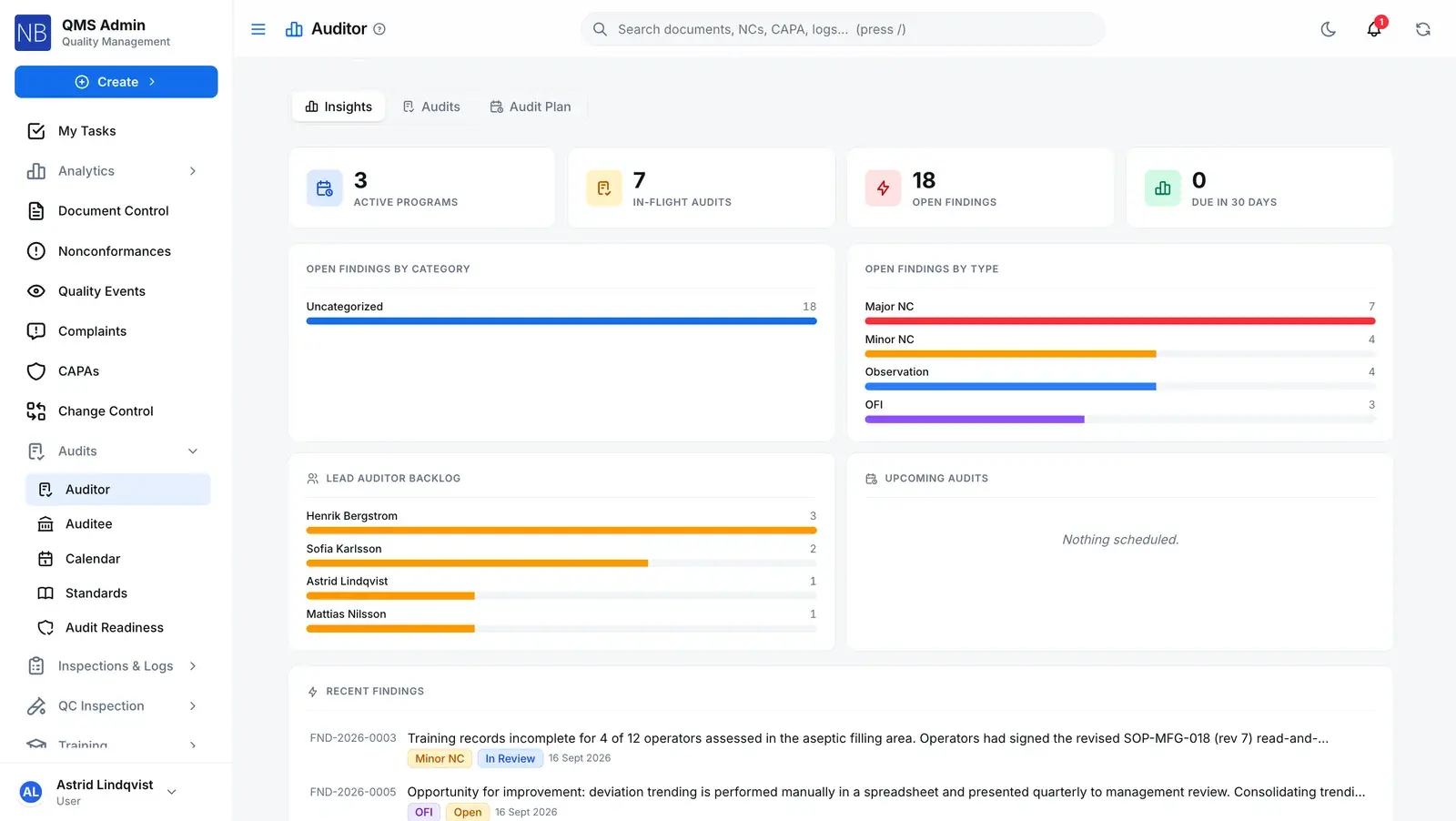
The Auditor insights dashboard in QAbility: active programs, in-flight audits and open findings, with open findings broken down by type, the lead auditors' backlog and the most recent findings.

The model

Five records, one inside the next.

A program schedules audits against a standard. An audit raises findings. A finding leaves as a nonconformance, CAPA or change request that points back to it. Pick a tier to see what it holds.

Program › Standard › Audit › Finding › Record

  1. ProgramMints audits on a cadence
  2. StandardFrozen onto each audit
  3. AuditRaises findings
  4. FindingLeaves as a record
  5. RecordPoints back to its finding

Examples are separate records from the Nordic demo tenant, read off real screens. They are not one chain.

Tier 1 of 5

Program

The recurring plan: an internal, external or supplier program with the standard it audits against, its cadence and its auditor pool.

What it stores

Type
Internal, External / Certification, or Supplier. The type an audit is minted with can never be changed afterwards.
Cadence
Monthly, quarterly, semi-annual, annual, every X days, one-time, or a custom recurrence.
Next due date
A daily job mints the audit when the date arrives and advances the date in the same transaction, so a re-run the same day mints nothing twice.
Auditor pool
Copied onto each audit as its team. With two or more lead auditors, the lead rotates to whoever has led the fewest past audits.

The rule

A program mints nothing until its standard has an effective version with at least one clause. The generator skips it and logs why.

Server refuses

In the demo tenant

Notified Body Surveillance & Certification

An external / certification program on ISO 13485:2016, run annually.
Tier 2 of 5

Standard

Your clause set, versioned. You author it, clone one you hold, or import it from pasted text, CSV or JSON. QAbility does not ship any standard’s text.

What it stores

Versions
Draft, under review, effective. A new effective version supersedes the last. An import lands as version 1.0, effective at once; later revisions go through review.
Clauses
Numbered clauses under their sections, each with auditor questions, people to interview, and guidance and expected evidence where you write them.
Content license
An import records which license the clause text is held under; for a copy you license yourself, who attested it and when.

The rule

A standard has at most one effective version at a time.

Database refuses

In the demo tenant

ISO 13485:2016

The clause set named on the demo tenant’s certification program — a library entry in that tenant, not content shipped with the product.

Tier 3 of 5

Audit

One execution: numbered, with its team, and run clause by clause against the standard version frozen onto it when it was created.

What it stores

Clause list
A copy of the effective version’s clauses, taken at creation. Editing the standard later cannot rewrite an audit already under way, and each response keeps its own copy of the clause text.
Responses
A verdict per clause — conforming, minor or major nonconformity, observation, opportunity for improvement, or not applicable — with notes, interviewees, checklists and evidence.
Status and phase
Two fields. The status is one of the four every quality record shares; the phase tracks the fieldwork while it is open (below).

The rule

Close-out is refused while any finding is still open or any clause below a section heading has no verdict.

Server refuses

In the demo tenant

AUD-2026-0057 Closed

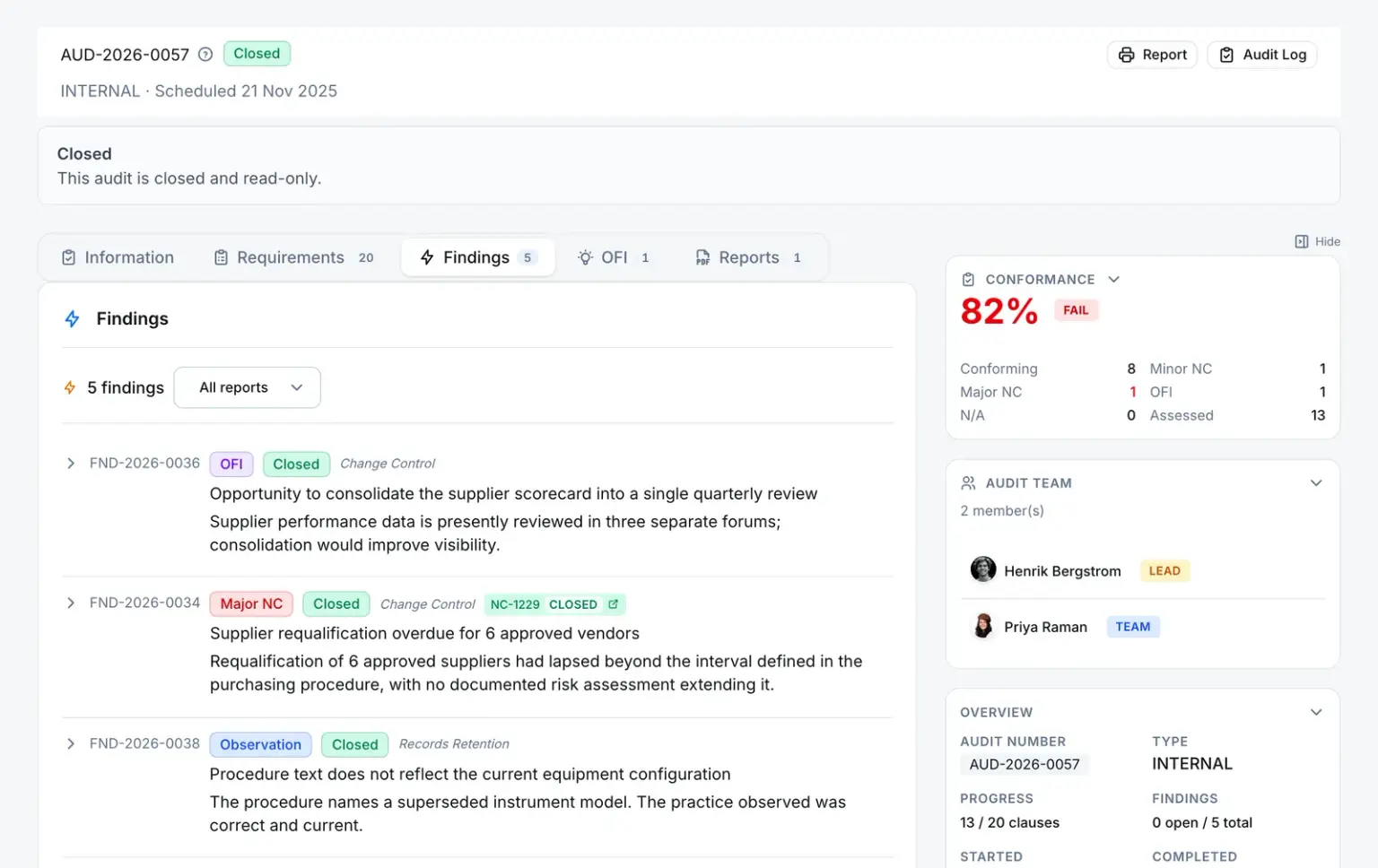
An internal audit scheduled for 21 Nov 2025, with five findings, none open. Closed and read-only.

Tier 4 of 5

Finding

A nonconformity, observation or opportunity for improvement. An auditor raises it, or scoring a clause a minor or major nonconformity raises it automatically.

What it stores

Type
Major nonconformity, minor nonconformity, observation, or opportunity for improvement.
Its clause
The response it came from. Re-score that clause as conforming and an automatic finding stands down to cancelled; score it nonconforming again and the same finding re-opens. A finding raised by hand is never touched.
Its records
One pointer each to a nonconformance, a CAPA, a change request and a training record.

The rule

A finding that points at a record cannot be deleted until it is unlinked, and a closed or cancelled audit takes no new findings.

Server refuses

In the demo tenant

FND-2026-0034 Closed

A major nonconformity on AUD-2026-0057 — supplier requalification overdue for six approved vendors — linked to NC-1229.

AUD-2026-0057 · Findings
An audit's Findings tab: a major nonconformity finding carrying a link to the nonconformance NC-1229 it was pointed at, alongside an observation and an opportunity for improvement, each with its own status.

Tier 5 of 5

Record

The finding leaves the audit as a record with its own lifecycle — not as a paragraph in a report.

  • Nonconformance
  • CAPA
  • Change request
  • Training (attach only)

What it stores

How it is linked
Attach an existing record, or open the NC, CAPA or change-request form pre-filled from the finding. There is no one-click create-and-link.
Where it came from
A lineage link is written, and the NC, CAPA or change request shows the audit and the finding that raised it, with the failed clause and its evidence.
Many to one
Several findings can be selected together and pointed at a single CAPA.

The rule

The origin panel shows only the findings that raised this record — never the rest of the audit — and only to people who can see the record.

Server refuses

In the demo tenant

NC-1229 Closed

The nonconformance FND-2026-0034 points at, closed.

Status and phase are two different fields.

The status is the one the database guards. The phase says where the fieldwork has got to while the audit is open — the status trigger does not look at it; the server decides who may move it.

An audit's status moves Draft, Open, Closed, or is Cancelled from Draft or Open. While the audit is Open its phase moves Scheduled, then In progress, then Review; when it closes the phase is stamped Complete.
  1. Draft

    Allowed, but the generator and a one-off create both start an audit Open. Nothing returns to Draft.

  2. Open

    Numbered, team set, clause list frozen. Everything below happens without the status changing.

    Phase, while Open

    1. ScheduledWhere every new audit starts
    2. In progressYou start fieldwork, or step back
    3. ReviewOnly by submitting for close-out

    Review goes back to In progress when a reviewer rejects or sends back the close-out. The status stays Open.

  3. Closedphase: Complete

    Terminal. The audit then refuses new findings, response edits and deletion.

  4. Cancelled

    From Draft or Open. Terminal, and kept apart from Closed for reporting.

  • In progress to Review

    Server refuses

    Submit for close-out. Refused while a finding is still open or a clause has no verdict, and the workflow picked must be an audit close-out template. Setting Review or Complete by hand is refused.

  • Review to In progress

    A reviewer rejects the close-out or sends it back. The audit stays Open; the rejection is kept on the workflow, and resubmitting starts a new approval cycle with its own signatures.

  • Review to Closed

    You configure

    The last approval step completes and the phase is stamped Complete. Each step asks for an electronic signature where it is set to — the default close-out template requires one on both of its steps. The signature belongs to the step; there is no separate audit-level signature.

  • Open to Closed

    Server refuses

    Certification audits only: a registrar’s audit you are recording has no close-out workflow of yours, so it is closed directly — but only once every finding is closed or cancelled. No close-out signature is taken.

  • Closed or Cancelled to anything

    Database refuses

    Refused. A client can create a Draft or Open audit and can never change a status itself; the server can only move it forward.

Findings run their own six statuses.

Database refuses
  • Open
  • In review
  • In remediation
  • Verified
  • Closed
  • Cancelled

A finding is created Open, and a client cannot write its status; the server moves it only along the eighteen transitions its own trigger lists. Unlike the audit, Closed and Cancelled are not final — a finding can be re-opened, because remediation often outlives the audit.

Every audit moves only along

  • Database refusesA client can only create a Draft or Open audit, and can never change its status. Status moves come from the server.
  • Database refusesClosed and Cancelled are final. Unlike an NC or a CAPA, a closed audit cannot be reopened.
  • You configureClose-out is signed on each workflow step that requires it. The default template requires it on both steps.
  • Database refusesEvery change to an audit or a finding is written to the append-only audit trail.

Where findings go

A finding leaves the audit as a record that points back.

The link is stored on the finding, and the record it raised shows the audit it came from.

Comes from — Audit finding

Findings are raised in an audit — by an auditor, or by a clause scored as a nonconformity.

Leads to — Audit finding

  • NonconformanceRaised

    The finding records the NC it produced, and the NC shows the audit it came from.

  • CAPARaised

    The finding records the CAPA it produced, and the CAPA shows the audit it came from.

  • Change requestRaised

    The finding records the change it produced, and the change request shows the audit it came from.

Any NC, CAPA, change request, internal complaint, quality event, inspection lot, document or custom-module record can also be linked by hand as related.

What holds

The rules an auditor can check.

One effective version per standard
A standard can have only one effective version at a time; making a new one effective supersedes the last. An audit is always run against the version that was effective when it was created.
Database refuses
An audit’s type is fixed
Internal, external or supplier is set when the audit is created and cannot be changed, because it decides whether the audit may close without the close-out workflow.
Database refuses
The clause list is frozen at creation
The standard’s clauses are copied onto the audit when it is created, and each response keeps its own copy of the clause text, so revising the standard never rewrites an audit.
Server refuses
No close-out with work outstanding
Submitting for close-out is refused while any finding is not yet closed or cancelled, and while any clause below a section heading has no verdict. A response saved without a verdict does not count.
Server refuses
Closed audits are sealed
A closed or cancelled audit takes no new findings and no response edits, and a closed audit cannot be deleted.
Server refuses
Your close-out route
You choose the close-out workflow and its reviewers. The default template is a lead-auditor review and a quality-manager sign-off, each requiring a comment and an electronic signature.
You configure

For your auditor

Only people with Manage Access on the module can share.

Bundle it for an audit

For an external audit, collect effective documents and quality records into one Audit Records Package — one link and one code for each auditor.

Audit program questions

What an audit manager asks first

Does every audit have to come from a program?

No. A program generates audits on its cadence, but you can create a one-off audit directly, with its own team. Internal and supplier audits have to name a standard with an effective version — that is what gets frozen onto the audit as its clause list. A certification audit you are recording can be created without one, because the registrar works from their own copy.

Do you supply the ISO clause sets?

No. The standards library is yours to fill: author a clause set, clone one you already hold, or import it from pasted text, CSV or JSON and record the license you hold it under. An import lands as version 1.0, effective at once; every later revision goes through draft, review and effective.

Does a finding create the CAPA for me?

Not in one click. From a finding you either attach an existing nonconformance, CAPA, change request or training record, or open the NC, CAPA or change-request form pre-filled from the finding and save it. Either way the link is stored on the finding, and the new record shows the audit and finding it came from. Several findings can be pointed at one CAPA.

What stops an audit being closed with findings still outstanding?

The submit action itself. It refuses while any finding is still open — each one has to be closed or cancelled — and while any clause below a section heading has no verdict. The workflow you pick also has to be an audit close-out template. A certification audit, which has no close-out workflow, is held to the same findings rule before it can be closed.

Can a closed audit be reopened?

No. Closed and Cancelled are final for an audit: the database trigger refuses every move out of them. Findings are deliberately different — a closed or cancelled finding can be re-opened, because remediation often outlives the audit.

Can we see what an auditor would find before they arrive?

Yes. The audit-readiness dashboard lists open nonconformances, CAPAs and quality events that have gone stale, documents waiting on review or approval, overdue periodic reviews, pending training, calibration gaps and logbook health — and lets you notify the person responsible for each one. The notification does not change the record.

See a finding become a CAPA without being retyped.